Invoicing built for contractors.
Estimates your clients sign on their phone, invoices they pay online, and payments that land in your books with the fees already sorted out.
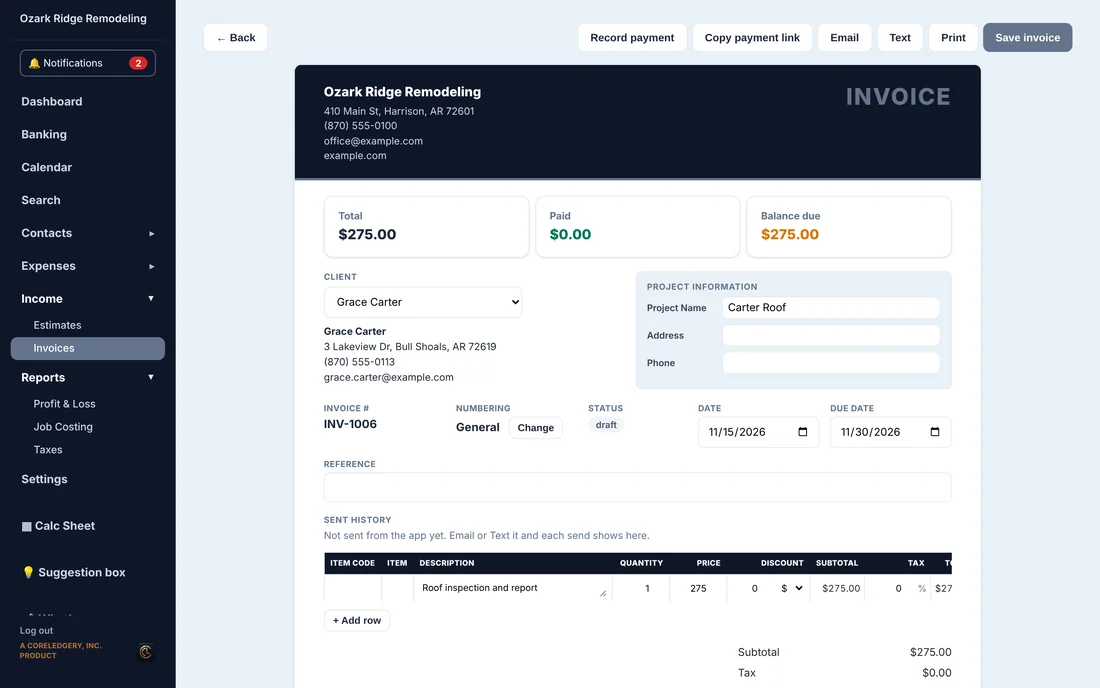
From estimate to invoice in one click
Build the estimate from your own item list or type the lines in. Send it by email or text from the app. Your client opens it on their phone, reviews it and signs it with a finger.
Once it is signed, one click turns the estimate into the invoice. The client, the job name and every line come with it, so nothing gets typed twice.
- Your own item list, with prices you set
- Clients sign on their phone, no app to install
- Email or text it, and see when and to whom it was sent
- Pick the numbering series (INV-, EST-, your own)
Get paid online, straight to you
Every invoice carries a pay link. Clients pay by card or bank, and the money goes to your own Stripe account, not ours.
When the payment settles, Investimates books it for you: the payment against the invoice, the Stripe fee as an expense, and the payout fee when Stripe sends the money to your bank. Refunds and disputes are booked the same way.
- Card or bank payments through your own Stripe account
- Stripe fees and payout fees book themselves
- Checks, cash, Zelle and wires recorded in two clicks
- One payment can cover several invoices
Know who owes you, at a glance
The dashboard shows what is owed, what is late and what is still a draft, grouped by week. A draft never counts as money owed until you send it.
Clients can also see their invoices, pay them and message you from their own client portal.
- Owed and overdue on the dashboard
- Drafts kept out of every total
- Void an invoice with a reason, and tell the client if you want
- A client portal for invoices, estimates, photos and messages
Questions
Do I need my own Stripe account?
Yes, to take card or bank payments online. You connect it once in Settings, and payments go straight to it. Checks, cash and other payments can be recorded without Stripe.
How do I get a Stripe account?
From inside Investimates. Go to Settings, then Sales, and press Connect with Stripe under Online Payments. If you do not have a Stripe account yet, Stripe walks you through making one: your business name and address, your EIN or Social Security number, and the bank account you want paid into. It is free to open; Stripe takes a small fee on each payment, and Investimates shows that fee on every payment. Already have Stripe? Sign in on the same screen and it connects.
Can clients sign estimates without an app?
Yes. They open a link on their phone or computer, review the estimate and sign it with a finger or a mouse.
Which plan includes invoicing?
Estimates, invoices and online payments start with the Solo plan at $24 a month, and are in every plan above it.
See it with a real-looking business.
Open the demo, click around, change anything. No sign-up, and it resets for the next person.